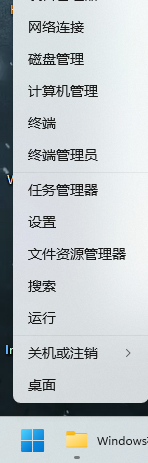
右键点击win11开始按钮,选择-终端管理员
在窗口中粘贴以下命令,回车执行
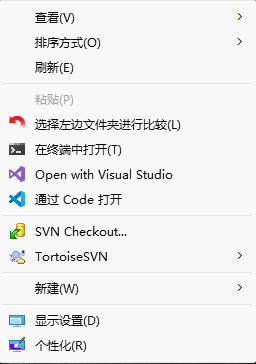
reg add "HKCU\Software\Classes\CLSID\{86ca1aa0-34aa-4e8b-a509-50c905bae2a2}\InprocServer32" /f /ve && taskkill /f /im explorer.exe & start explorer.exe命令执行后Windows资源管理器会自动重启(桌面黑屏瞬间后恢复),经典菜单生效;

季節の変わり目の服は何着りゃいいんだろ





右键点击win11开始按钮,选择-终端管理员
在窗口中粘贴以下命令,回车执行
reg add "HKCU\Software\Classes\CLSID\{86ca1aa0-34aa-4e8b-a509-50c905bae2a2}\InprocServer32" /f /ve && taskkill /f /im explorer.exe & start explorer.exe命令执行后Windows资源管理器会自动重启(桌面黑屏瞬间后恢复),经典菜单生效;
Comments NOTHING